Pagination
[!NOTE]
- Different pagination models enable different client capabilities.
- I tried
prisma-nestjs-graphqllib and here is the result:apps/botprobe-nestproject.
- I decided to try out
nestjs-querysince it looks more promising both from filtering capabilities, pagination and auth (learn more here).- To lean more about pagination in general read this.
- To learn more about efficiency in SQL you can read this.
- Read this great article in apollo website Relay-Style Connections and Pagination.
- A related post to this topic from a bigger point of view would be: Zero, One, Infinity Principle in Software Development.
To traverse the relationship between sets of objects. we can have a field that returns a plural type:
{
  post {
    id
    title
    comments {
      id
      content
      user {
        id
        username
      }
    }
  }
}
- Some fields return a list of values.
-
Accept
firstandafterto allow for specifying a specific region of a list.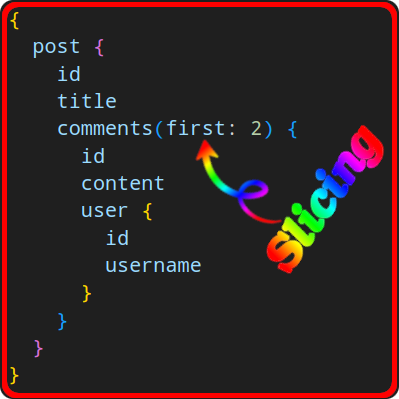
But this is not gonna cut it when our client needs to paginate. Here are some API designs we can have:
comments(first:2 offset:2)returns the next two in the list.comments(first:2 after:$commentId)returns the next two after the last comment we fetched.comments(first:2 after:$commentCursor)returns the next two comments from where the cursor points to.
Cursor-based pagination is the one we’ll use.
Cursor-based pagination in GraphQL
[!TIP]
Since the “cursor” is opaque, it can be anything. E.g. in
nestjs-queryby default it is not using a keyset cursor approach. JFYI, it does not matter what is our ORM/ODM, what matters is to understand that due to the opaque nature of cursornestjs-queryby default uses a type offset pagination beneath the cursor-based pagination.learn more about
nestjs-query’s pagination here and now let’s look at the GraphQL query and its generated SQL query by the TypeOrm:
Note that we have both previous page and next page in this particular example. SQL Query GraphQL Query ```sql SELECT "Alert"."id" AS "Alert_id", "Alert"."title" AS "Alert_title", "Alert"."userId" AS "Alert_userId", "Alert"."updatedAt" AS "Alert_updatedAt" "Alert"."createdAt" AS "Alert_createdAt", "Alert"."alertTypeId" AS "Alert_alertTypeId", "Alert"."description" AS "Alert_description", FROM "alert" "Alert" LIMIT 5 OFFSET 13 ``` ```graphql query { alerts(paging: { "paging": { "last": 4, "before": "YXJyYXljb25uZWN0aW9uOjE4" } }) { edges { cursor node { id title createdAt } } pageInfo { endCursor hasNextPage startCursor hasPreviousPage } } } ``` ```sql SELECT "Alert"."id" AS "Alert_id", "Alert"."title" AS "Alert_title", "Alert"."description" AS "Alert_description", "Alert"."userId" AS "Alert_userId", "Alert"."alertTypeId" AS "Alert_alertTypeId", "Alert"."createdAt" AS "Alert_createdAt", "Alert"."updatedAt" AS "Alert_updatedAt" FROM "alert" "Alert" LIMIT 7 ``` ```graphql query { alerts(paging: { "paging": { "first": 6 } }) { edges { cursor node { id title createdAt } } pageInfo { endCursor hasNextPage startCursor hasPreviousPage } } } ``` ```sql SELECT "Alert"."id" AS "Alert_id", "Alert"."title" AS "Alert_title", "Alert"."description" AS "Alert_description", "Alert"."userId" AS "Alert_userId", "Alert"."alertTypeId" AS "Alert_alertTypeId", "Alert"."createdAt" AS "Alert_createdAt", "Alert"."updatedAt" AS "Alert_updatedAt" FROM "alert" "Alert" LIMIT 7 OFFSET 6 ``` ```graphql query { alerts(paging: { "paging": { "first": 6, "after": "YXJyYXljb25uZWN0aW9uOjU=" } }) { edges { cursor node { id title createdAt } } pageInfo { endCursor hasNextPage startCursor hasPreviousPage } } } ```
How can we send the cursor to the client?
- We obviously do not wanna add it to our
Commenttype. - It is a property of the
comments, not of thepost.
Relay cursor connections
- A generic specification for how a GraphQL server should expose paginated data.
- A predictable contract between the client & server.
- Might seems a bit complex but that’s because it is so generalized.
- Therefore we’ll go through it step by step.
- “Connections” is a feature-rich pagination design pattern.
- Relay knows how to work with “Connections” design pattern.
[!TIP]
Lovely specification:
To ensure a consistent implementation of this pattern, we can take a loo at the Relay Cursor Connections Specification.
Add a new layer of indirection
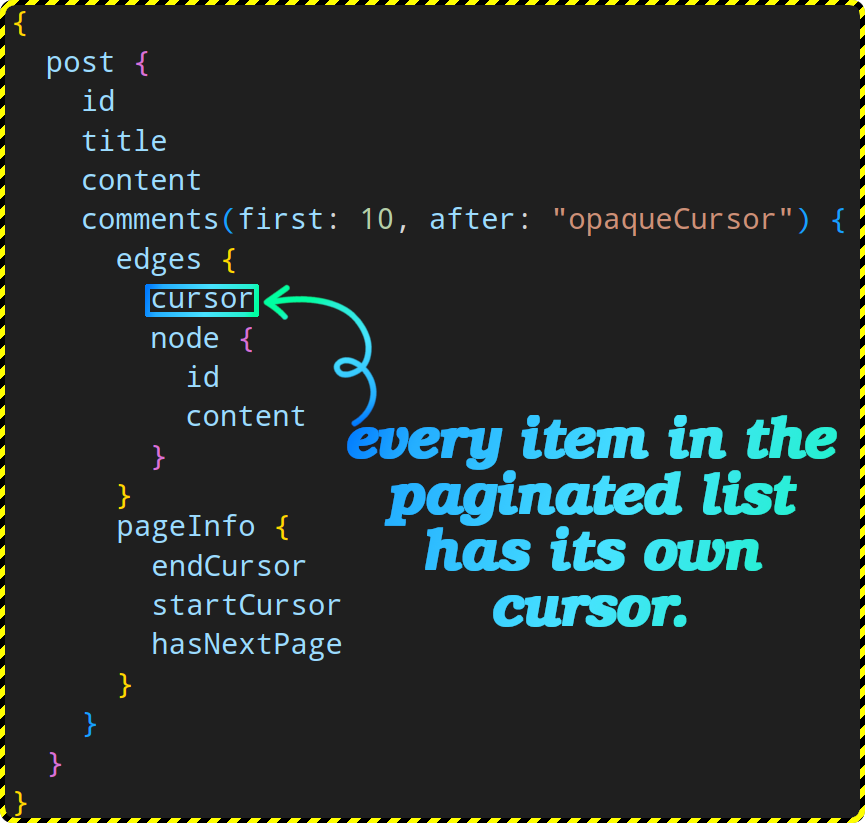
- Our
commentsfield should give us a list of edges. - An edge has both:
- A cursor.
- The underlying node.
- We can also ask for additional information about the connection itself, e.g.:
- How many comments is written for that post?
- Is there more connections (comments to fetch)?
- Etc.
[!IMPORTANT]
# Buzzwords:
- Connection is the paginated field on an object, e.g.
commentsinpost.- Each edge has:
- Metadata About one object in the paginated list.
- A cursor to allow pagination starting from that object.
- Node: represents the actual object user was looking for.
- pageInfo:
- Lets the client know if there are more pages of data to fetch.
- In Relay spec it does NOT tell you the total number of items, because the client cache doesn’t need that info.
- But we can add it too through another field outside of
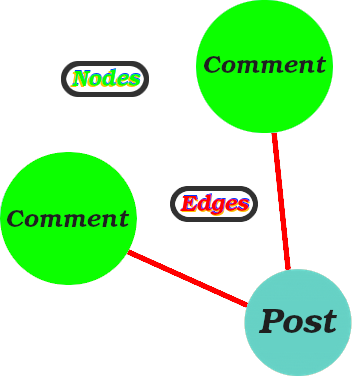
pageInfo.To help you better understand the naming convention you can think of it as graph:
Why Were Connections Created?
- A very crucial existential question.
- To have a very efficient method of paging.
- To have a common nomenclature that is generic enough to encompass everything.
Designing GraphQL Schema
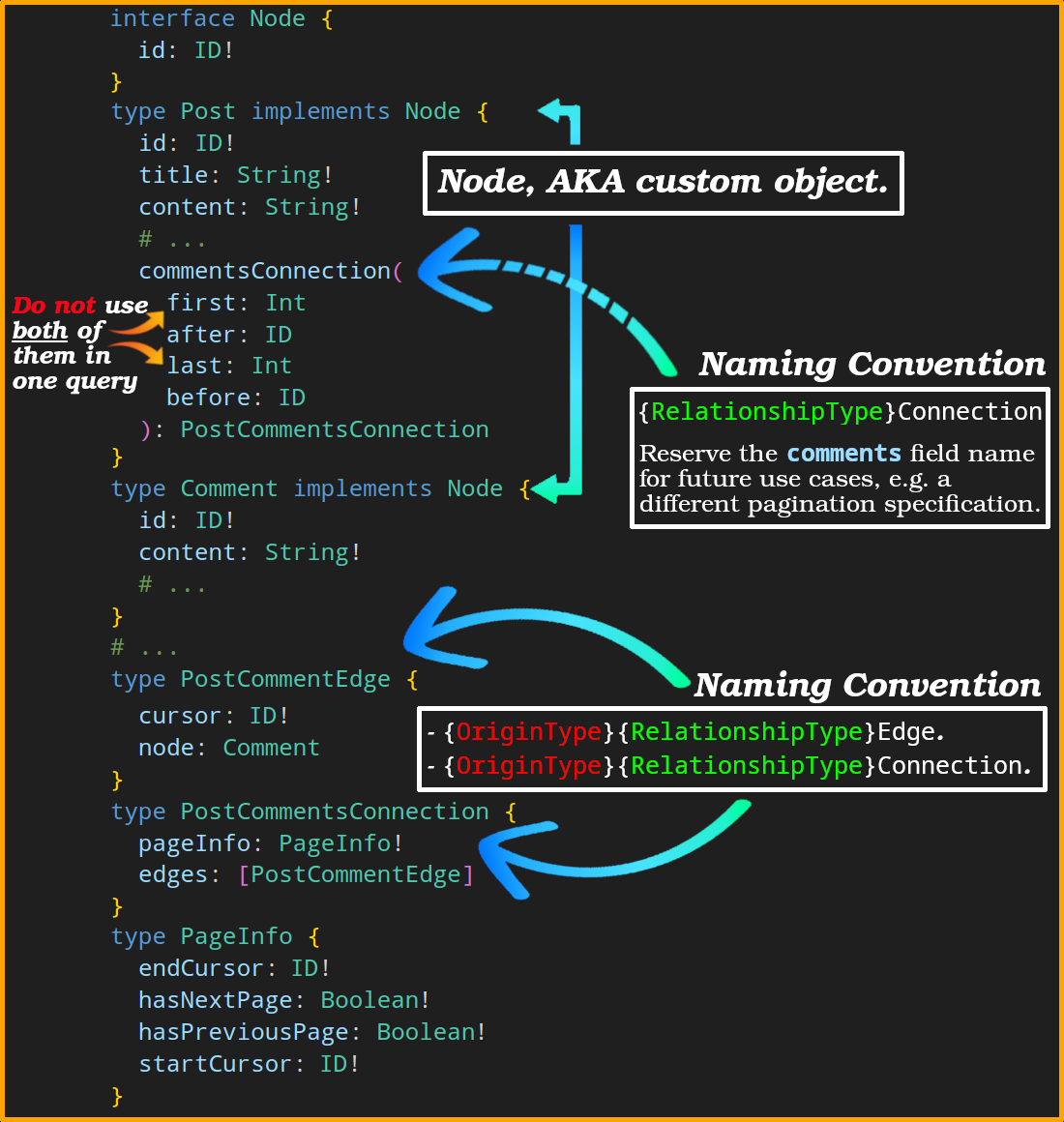
PostCommentsConnection:- A wrapper type.
- Fields:
-
edges.Fields inside it
-
nodecontains the actual comment's data.
Cannot be a list! cursoris the cursor to that "node".- Can have additional fields related to the edge
-
-
pageInfo:Fields inside it
-
startCursoris the first cursor of the currently fetched page and not the very first record in our database! -
endCursoris the last cursor of the currently fetched page and not the very last record in our database! -
hasNextPageindicates whether there is a next page or not. -
hasPreviousPageindicates whether there is a previous page or not.
-
-
Enables modeling additional info/attributes, related to the connection, where they DO NOT belong to the entities in our edges.
-
PostCommentEdge:- An actual entity in our graph.
- A wrapper type.
- Here can can model other info that do not belong to the post, nor the comment itself. E.g.:
- Tone of a comment for a specific post, is it negative, or positive, stuff like that. This info is being generated because of the relationship between comment and post.
- Or a specific customer might shop at one business in store and another online. This is an attribute of the relationship between a business and customer.
- Without wrapper types (edge & connection), you don’t have a place to put this data.
commentsConnection: you can perform forward pagination, backward pagination, or both.- Forward pagination:
first:- Mandatory.
- Slices the data, i.e., returns that many comments.
after:- Mandatory.
- Paginates through the data, i.e., returns comments after that cursor.
- Backward pagination:
last:- Required.
- A non-negative integer.
before:- Required.
- Returns the nodes before that cursor.
[!TIP]
Some general validations for these args:
export function validatePagination( forwardPaging: { after: string; first: number }, backwardPaging: { before: string; last: number }, ) { if (forwardPaging.first < 0) { throw new Error( 'ForwardPagingArg.first cannot be less than 0', ); } if (backwardPaging.last < 0) { throw new Error( 'BackwardPagingArg.last cannot be less than 0', ); } if ( !isNil(backwardPaging.last) && isNil(backwardPaging.before) ) { throw new Error( 'BackwardPagingArg property before cannot be undefined when you specify last', ); } if ( !isNil(forwardPaging.after) && !isNil(backwardPaging.last) ) { throw new Error( 'ForwardPagingArg.after cannot be specified with BackwardPagingArg.last', ); } if ( !isNil(forwardPaging.first) && !isNil(backwardPaging.before) ) { throw new Error( 'ForwardPagingArg.first cannot be specified with BackwardPagingArg.before', ); } }- Forward pagination:
[!CAUTION]
Sort edges the same way, in both, forward pagination and backward pagination. I.e.,
after: the edge closest tocursormust come first.before: the edge closest tocursormust come last.
[!TIP]
In graph theory, an edge/connection can have properties of its own which act effectively as metadata;
enum CommentSentiment { NEUTRAL POSITIVE NEGATIVE } type PostCommentEdge { cursor: ID! node: Comment sentiment: CommentSentiment }Note: most tools treat the edge type as boilerplate. But we are not gonna do that, we add data that belongs to the edge to the
edgetype.
3rd-party libs
- In Prisma we have libraries such as prisma-relay-cursor-connection.
- Or ORM agnostic libraries such as nestjs-graphql-connection.
Ref
- Pagination.
- Understanding pagination: REST, GraphQL, and Relay.
- Explaining GraphQL Connections.
- Implementation of Relay-style pagination with Prisma Client JS.
Sorting + Relay Pagination
What is the common practice for adding sorting to a Relay pagination? Does backend need to encode the sorting criteria in the opaque cursor or is this something that needs to be specified with each query?
These were my questions the first time I through about having Relay pagination and sorting and this trips up a lot of developers the first time they combine Relay-style cursor pagination with sorting, so here is my two cent:
- Sorting is provided explicitly as query arguments (e.g.,
sortBy: { field: CREATED_AT, direction: DESC }). - Cursors stay opaque and encode only the position in the current sort order, not the sort rules themselves.
- Changing sort order requires a new query starting from the beginning (no
after/beforecan be reused across different sorts).- For this we cannot really have a validation in the backend.
- If client mid air changes their criteria and use the cursor they have the result won’t make any sense. In other words this is the responsibility of the client.
- Cursors should be stable by including the last item’s sort key(s) and a tie-breaker (commonly the item id) so ordering is deterministic.
Why not just Encode the Sorting Criteria in the Opaque Cursor?
- Cursors represent a position within a specific ordering; they should NOT silently change the ordering.
- The client should be explicit about the desired sort to keep queries predictable and cacheable.
- If you bind sort to cursor, you will end up with confusing mismatches when the client changes sorting.
- Encoding it in the cusror will complicate the cache keys.
interface Node {
  id: ID!
}

type PageInfo {
  hasNextPage: Boolean!
  hasPreviousPage: Boolean!
  startCursor: String
  endCursor: String
}

type UserEdge {
  cursor: String!
  node: User!
}

type UserConnection {
  edges: [UserEdge!]!
  pageInfo: PageInfo!
  totalCount: Int!
}

type User implements Node {
  id: ID!
  name: String!
  email: String!
  createdAt: String! # ISO-8601
  lastLoginAt: String
}

enum UserSortField {
  NAME
  CREATED_AT
}

enum SortDirection {
  ASC
  DESC
}

input UserSort {
  field: UserSortField!
  direction: SortDirection! = ASC
}

input UserFilter {
  active: Boolean
  query: String
}

type Query {
  users(
    first: Int
    after: String
    last: Int
    before: String
    filter: UserFilter
    sortBy: UserSort = { field: CREATED_AT, direction: DESC }
  ): UserConnection!
}
What goes into the cursor?
// @ts-check

const lastItem = { createdAt: new Date(), id: '12345' };
const cursor = Buffer.from(
  JSON.stringify({ k: lastItem.createdAt, id: lastItem.id }),
).toString('base64');

console.log(cursor); // eyJrIjoiMjAyNi0wMi0xOVQyMjowNTozNC4xMjhaIiwiaWQiOiIxMjM0NSJ9
Bascially your cursor is a bookmark to the last item you saw, built from:
- The primary sort key (e.g., createdAt, name) and
- A tie‑breaker (usually a unique id).
So the server knows exactly where to resume next time – without repeating or skipping items:
- If you sorted by
createdAt DESC. - And your last item on page 1 had
createdAt = 2025‑01‑01T12:00:00Z. - Your page‑2 query becomes: “Give me items with
createdAt < 2025‑01‑01T12:00:00Z”.
This is known as “keyset pagination” (or “seek” pagination). It’s fast and stable because we don’t rely on OFFSET.
Then what do we mean by a tie‑breaker? Many items can share the same primary sort key:
- Many products can have the same price.
- Many names can start with “Alex”.
A tie‑breaker is a second field used to define a unique total order among items that share the same primary sort key, e.g. your SQL query would look like this when you are sorting by newser first (created_at DESC):
SELECT id, created_at
FROM users
WHERE
  (created_at < TIMESTAMPTZ '2025-01-01T12:00:00Z')
  OR (
    created_at = TIMESTAMPTZ '2025-01-01T12:00:00Z'
    AND id     < 'A'
  )
ORDER BY created_at DESC, id DESC
LIMIT 25;
[!TIP]
It you need to use a lexicographic predicate. To demonstrate this you can first create
userstable and seed it with some dummy data:DROP TABLE IF EXISTS users; CREATE TABLE users ( id TEXT PRIMARY KEY, created_at TIMESTAMPTZ NOT NULL ); INSERT INTO users (created_at, id) VALUES ('2025-01-01T12:00:00Z', 'B'), ('2025-01-01T12:00:00Z', 'A'), ('2024-12-31T23:59:00Z', 'Z');Now if you try to fetch data with the assumption that the cursor (last item on the previous page) is (
created_at = '2025-01-01T12:00:00Z', id = 'A'):SELECT id, created_at FROM users WHERE created_at = TIMESTAMPTZ '2025-01-01T12:00:00Z' AND id < 'A' ORDER BY created_at DESC, id DESC LIMIT 25;This will return:
 id | created_at
----+------------
(0 rows)
But if we change our query to lexicographic predicate:
SELECT id, created_at
FROM users
WHERE
  (created_at < TIMESTAMPTZ '2025-01-01T12:00:00Z')
  OR (
    created_at = TIMESTAMPTZ '2025-01-01T12:00:00Z'
    AND id     < 'A'
  )
ORDER BY created_at DESC, id DESC
LIMIT 25;
Will return:
id | created_at ----+------------------------ Z | 2024-12-31 23:59:00+00 (1 row)Note:
- For
ASCorder, flip the operators:>instead of<, andORDER BY created_at ASC, id ASC.- Always include both fields in the
ORDER BY(primary sort + tie-breaker) to keep the order deterministic and avoid duplicates/skips.- If one of the fields can be
NULL, decide a policy (e.g.,ORDER BY created_at DESC NULLS LAST, id DESC).- Index matching sorting criteria for better performance, in our case
created_atandid:CREATE INDEX IF NOT EXISTS users_created_at_id_desc ON demo_users (created_at DESC, id DESC);