Multithreading
- Perform multiple tasks at the same time.
- It is good for when you wanna perform I/O tasks, e.g.:
- Make HTTP calls.
- Store something in DB.
- Keep in mind multithreading is all good and well but they will complicate your code and make debugging harder.
- Without multithreading you cannot have these kind of codes:
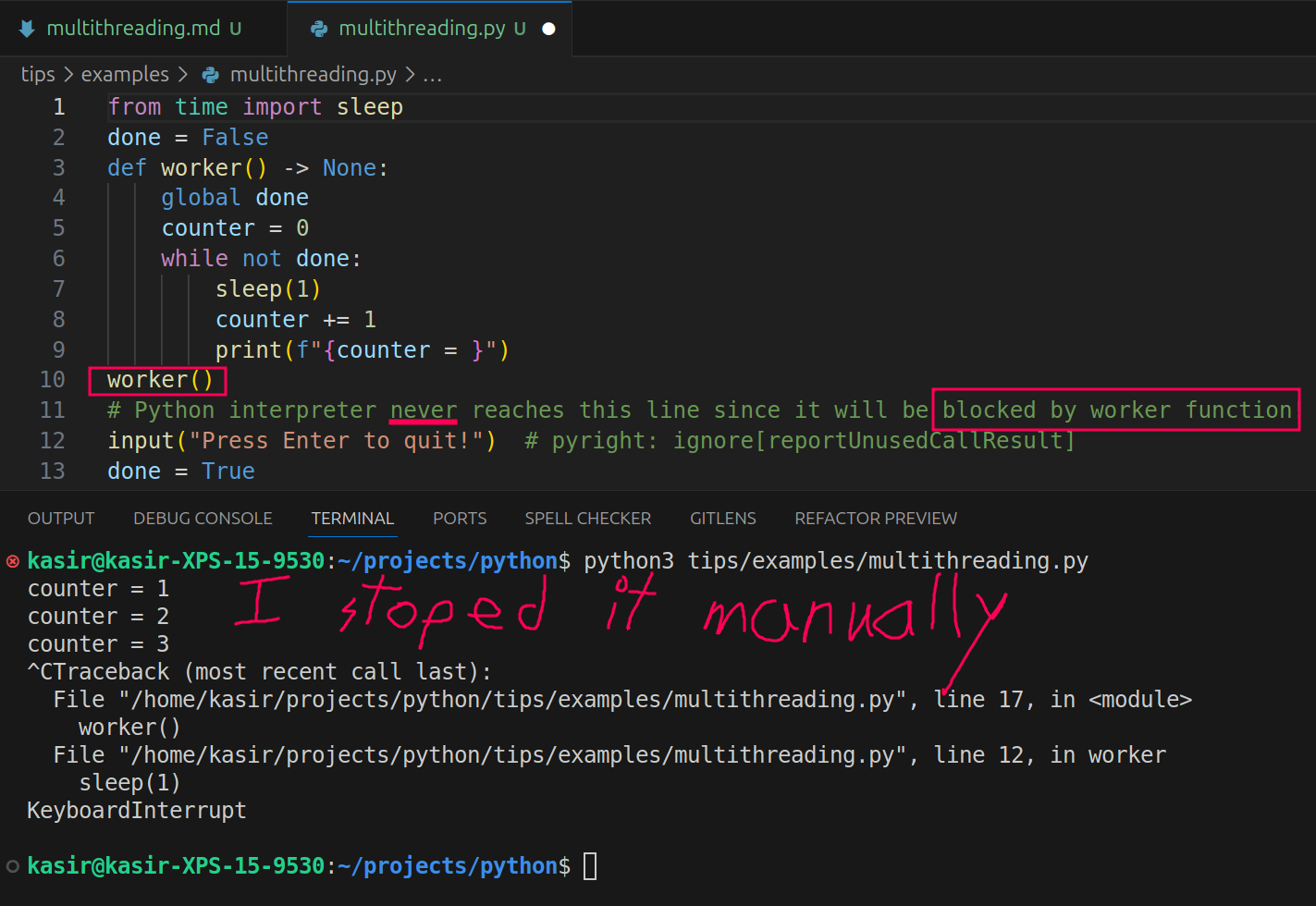
But if you use the Thread class you can run function in a separate thread.
[!CAUTION]
We have Global Interpreter Lock (GIL for short) which allows only a single thread to be running at a time. But nonetheless it is way better than having everything in a single thread. This is not an issue generally with
multiprocessingandasynciosince the former is an entire separate process with its own GIL and the latter is just simply a completely different paradigm. So in shortThreadclass used down below does NOT allow for actual parallelism.

[!CAUTION]
Here if we change the loop to
while True, even if you hit enter it wont quit. The reason is simple, main thread has nothing else to run, but the other thread is still executing theworkerfunction.Though you can tell Python interpreter that a thread should be closed ASAP, the main thread closes. Imagine you have a FastAPI/Flask/Django or any other frameworks you can use to develop a RESTful/GraphQL/gRPC API. You might have some RabbitMQ messages your API needs to consume and you do NOT wanna create a separate worker for it. Then you can just try to have a thread running in the background which consumes the incoming messages:
# ...
thread = Thread(target=rabbitmq_consumer, daemon=True)
# ...
Keep in mind
daemon=Truealone is not the full production-grade solution:
- No graceful shutdown. A daemon thread is killed abruptly the moment the main thread exits, even mid-message. If you hadn’t ack’d yet, RabbitMQ will redeliver it (fine if your processing is idempotent), but any partial side effect (e.g. a half-finished DB write) can leave inconsistent state. Mature setups usually register
SIGTERM/SIGINThandlers that callchannel.stop_consuming()andthread.join(timeout=...)to drain cleanly before the process dies, instead of relying on the daemon flag to just yank the thread.- No crash recovery. If the consumer thread raises an unhandled exception, it dies silently, your API keeps serving HTTP requests, but message consumption has quietly stopped. You’d want reconnect/retry logic around the consume loop (e.g.
pika’s connection recovery) plus logging/alerting.- At scale, prefer a separate process. A thread-in-API-process consumer is a fine lightweight/dev-scale pattern, but once message correctness and throughput matter, most teams run the consumer as its own worker process/deployment (e.g. Celery, or a standalone
worker.py) instead of sharing the API process’s lifecycle.Example with a Strawberry GraphQL API: a daemon thread consumes RabbitMQ, and
SIGTERM/SIGINThandlers do the gracefulstop()/join()this note talks about.Example of the “separate process” bullet above: the same consumer pulled out into its own
worker/service, with the API left only talking to Redis pub/sub, plus a docker-compose stack and pytest/testcontainers integration tests proving a worker crash never loses a message.
Passing Arguments to the Function
argsaccepts a tuple.
def worker(some_arg: str):
    print(some_arg)
Thread(target=worker, args=("abc",))
[!TIP]
If you need to wait for the threads to finish their tasks and after that you wanna continue you need to use the
thread.join()method.
The Pipeline Design Pattern
So I have implemented a complete pipeline using threads in python and honestly it looks fantastic. You can find the post I wrote about it here: https://dev.to/kasir-barati/the-pipeline-pattern-15j5
And this example is pushing it to the next level.