Pagination
[!TIP]
To have a more readable query you can also try to use CTEs. But here we just used subqueries whenever possible.
OFFSET implementation
OFFSETinstructs the database to skip the first N results of a query.- We need to calculate all the pages and return these infos too;
lastPage.limit.skiporoffsetitself.
-
When we do NOT specify it, it is equal to 0;
-
We have a table called “news_articles”.
column name type iduuidtitleTimestampcreated_atTimestampupdated_atTimestamp - We wanna fetch part of the store data according to the
WHEREclause,OFFSET, andLIMIT.
Breaking the problem into two half
- How can I do it in two separate queries (super simple).
- How can I combine them into one query, I do not like the sound of a two I/O whereas I can do it in one.
Separate queries
-
Selecting data:
SELECT *
FROM public.news_articles
WHERE title LIKE '%something%'
ORDER BY created_at ASC
OFFSET 0
LIMIT 10;
[!CAUTION]
- It is important to add
OFFSETandLIMITafter everything else. Otherwise your query will fail when you execute it. -
Do not omit
ORDER BYwhen you have usedLIMITif you want to be able to predict what subset of data you’re gonna receive.Query optimizer takes
LIMITinto account when generating query plans, so you are very likely to get different plans (yielding different row orders) depending on what you give forLIMITandOFFSET.Using different
LIMIT/OFFSETvalues to select different subsets will give inconsistent results unless you enforce a predictable result ordering withORDER BY.This is not a bug; it is an inherent consequence of the fact that SQL does not promise to deliver the results of a query in any particular order unless
ORDER BYis used.
— Ref.
- It is important to add
-
Counting all the records, so that we can calculate next page and previous page number if any:
SELECT COUNT(id) as "total"
FROM public.news_articles;
Here we are using
COUNT(id)so that we are sure we are counting all the records. As you know this aggregate function won’t count null values. Thusidis the best choice. — Ref -
And then we can just calculate the previous page and next page like this:
SELECT total / 10::double precision AS "totalPage";Then if
totalPageis bigger than the current page ((limit + offset) / limit)- I just increase the page by one and previous page will be the current page.
- Otherwise there is not next page. But our previous page would be the current page minus one.
Learn more about casting. In this example we: - Invoked a cast through its
construct: i.e.10::double precision. - But we could do it also explicitly: i.e.CAST(10 AS double precision).
Smashing and combining all of these
-
Nested queries: For that to happen we need to write a subquery within our main query. So that we can get everything in one fell swoop.
Read about more here, and I could not find something more elaborate. Dunno if they missed it or simply I was not able to find the doc related to subqueries. But most likely it is scattered in their website.
-
We also need to utilize some of the builtin functions of PSQL:
SELECT *, (total / 10::double precision)::int AS "totalPage"
FROM (
  SELECT
    (SELECT COUNT(id)
     FROM public.news_articles
    ) AS "total",
    (SELECT JSON_AGG(TO_JSONB(filtered_news_articles))
     FROM (SELECT *
           FROM public.news_articles
           WHERE title LIKE '%something%'
           ORDER BY created_at ASC
           OFFSET 0
           LIMIT 10
          ) as "filtered_news_articles"
    ) AS "data"
);
This query will return something like this if you wanted to see it in plain JSON:
{
  "total": 50,
  "data": [
    {
      "id": "9b050c4f-e0dc-4c19-9e02-844957a67522",
      "title": "A title with something inside it!"
      // ...
    },
    {
      "id": "b5c5c3c9-75c9-4495-908f-47e42abc92a9",
      "title": "Is something ready?"
      // ...
    },
    // ...
  ],
  "totalPage": 5
}
[!IMPORTANT]
- In a real world app we usually tend to use dynamic values for
limit&offset. That’s why I used a cast operator to convert limit into double precision. Otherwise it would performed an integer operation and that could lead to not seeing last page’s data.- Here we are converting the
totalPageback tointagain after it is calculated.- Calculating everything in SQL can become cumbersome if you over do it. Just look at how much harder it is to read it just because we wanted to have the
totalPagecalculate inside SQL. But instead we could do it in our codebase.
Why you should not probably use OFFSET for pagination
- The database fetches rows from the disk. Then it drop part of it and return the rest.
OFFSETtakes only one single parameter, thus bigOFFSETs impose a lot of work on the database.-
If a new rows were to be inserted in between two separate request you might get duplicate data.
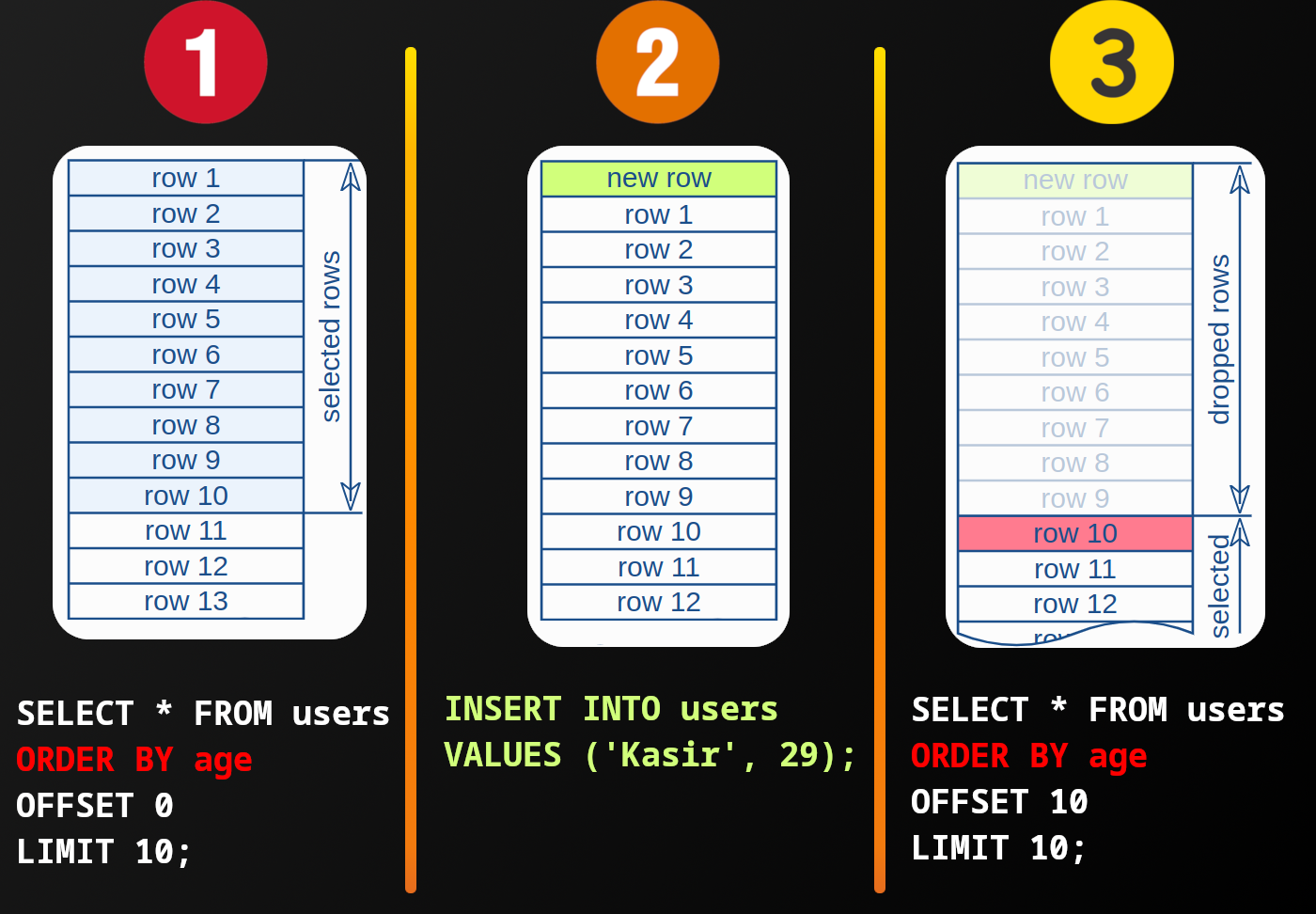
[!CAUTION]
The part that is also contributing in this behavior is where we are sorting based on age since kasir in this case might end up higher in the fetched records, thus leading to this buggy behavior.
But here we are sorting news based on
created_at. So this situation won’t happen.
The root cause of this issue lies in the fact that we are only telling database how many records should be dropped. No more. And, well this is not very much context.
Thus after seeing how we can implement it with OFFSET we’re gonna discuss a better option.
- We are working on a sorted data set (
ORDER BY...). -
We’ll ask database to only returns from the point that we’ve seen last time:
SELECT * FROM users
WHERE id < ?last_seen_id # parameter placeholder
ORDER BY id DESC
FETCH FIRST 10 ROWS ONLY
[!NOTE]
AKA seek method or keyset pagination.
- You can add more condition to the
WHEREclause if you need. - Applicable to both SQL and NoSQL.
Benchmark
-
Note that
topicis indexed in the following query; i.eCREATE INDEX news_articles_topic_index ON news_articles(topic);
OFFSET 0
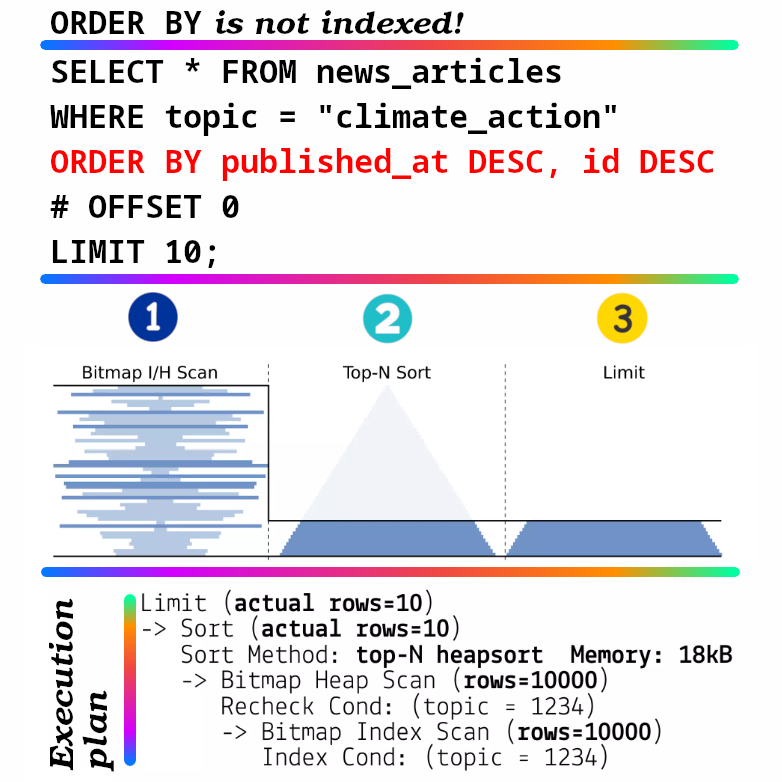
Here we’re:
- Bitmap index/heap scan: database engine scans the rows using a bitmap index scan based on the
WHEREclause (what we have now is an unsorted result). -
Sorting results by:
published_atin descending order (those published will be returned first)- Then by
idin descending order if there are ties.
“top-N heapsort” is used since we only want a couple of sorted rows (learn more about it here).
[!NOTE]
BTW when I tried this query in my local system it was using quicksort algorithm and not top-N, :confused:.
Learn more about this topic here.
- We are returning only the amount specified in the
LIMITclause.
OFFSET 10
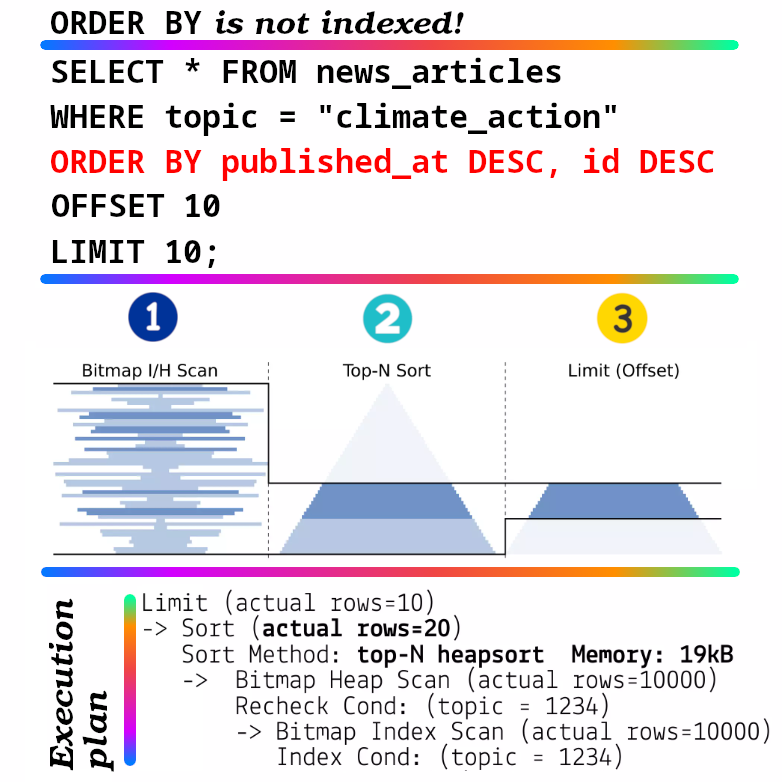
-
As you can see here we are now using a little more memory. But this amount increases as we go further backward. To the extend that PostgreSQL uses disk to sort things and limit them since they exceed the defined value for
work_mem.You can see what is the defined value in your database by running
SHOW work_mem;. In my case it was 4MB.Thus when we reach a point that it can no longer sort data in memory it will turn to disk.
OFFSET 40
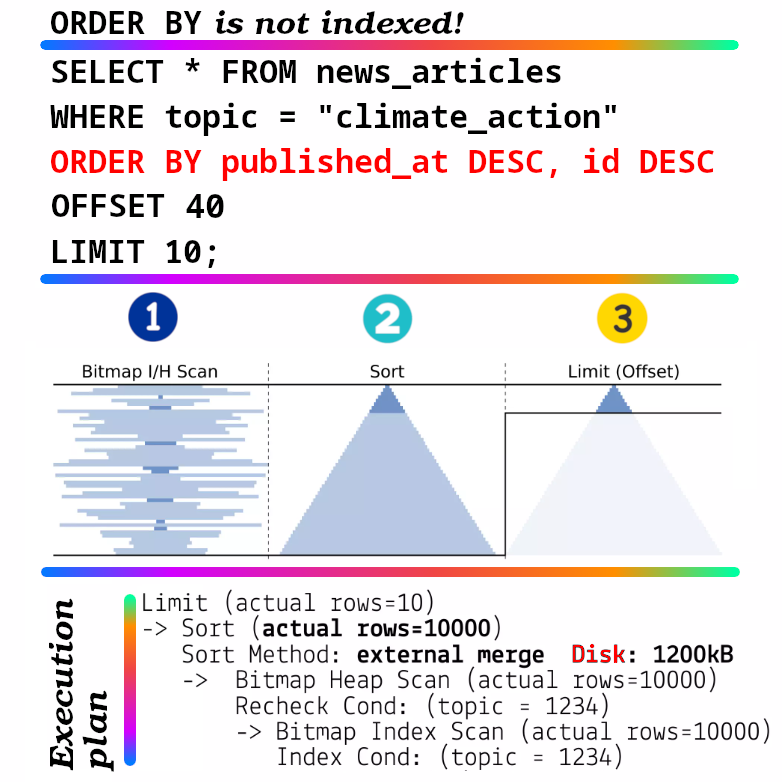
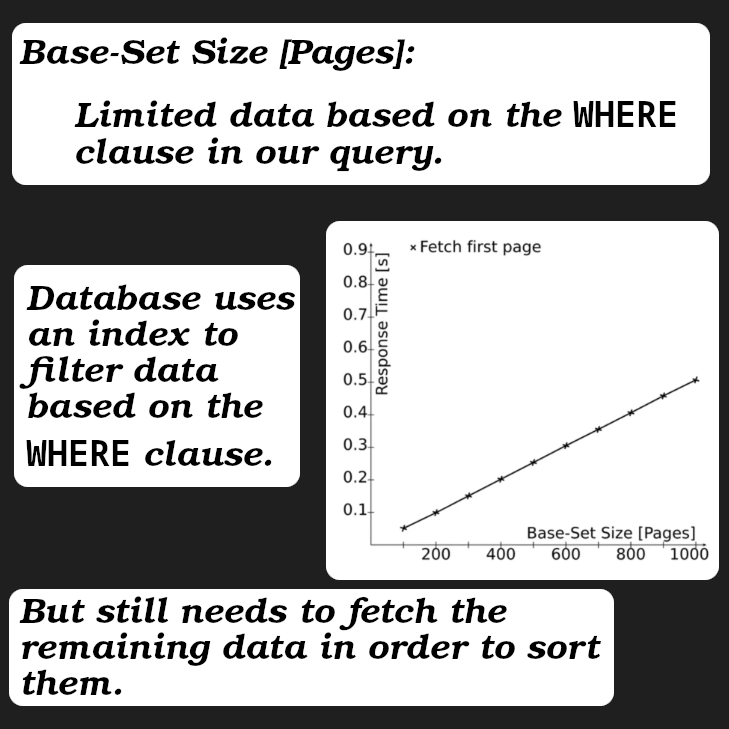
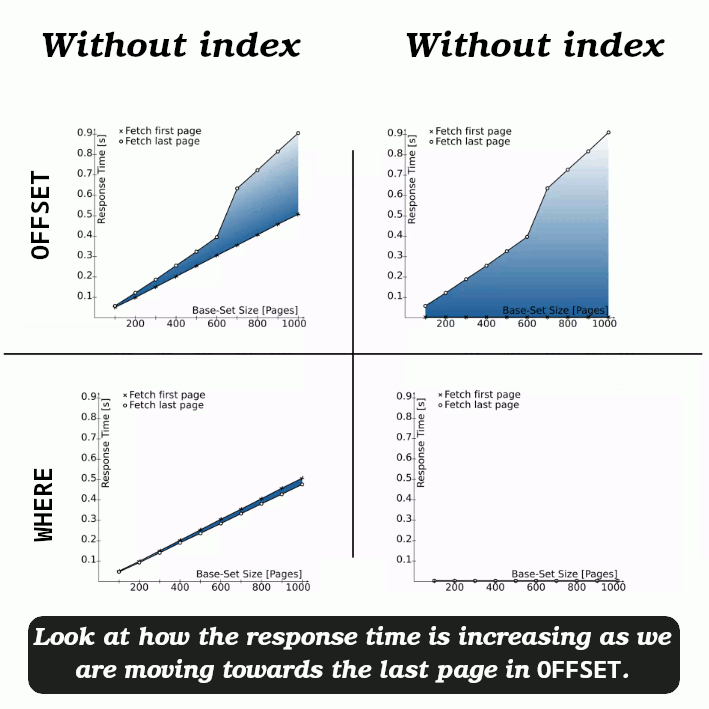
As you can see the bigger the dataset we have after WHERE clause the more time it takes.
Conclusion for these different OFFSETs
Pay attention to the shaded area between the two lines to see the differences between the two series.
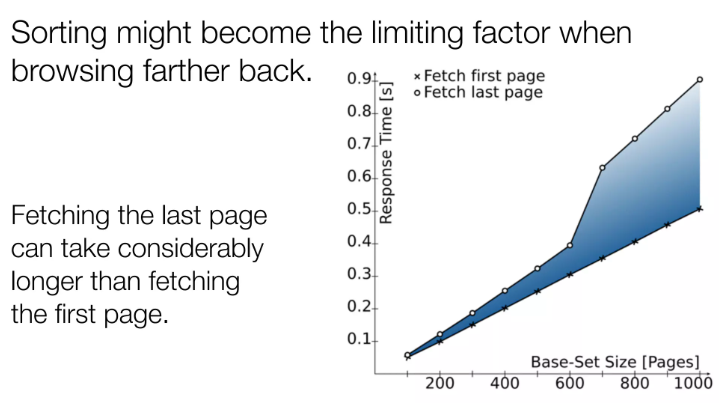
- As our dataset (fetched data) grows our response time also increases.
- Fetching first page is not the same as fetching last page.
-
We can improve this by indexing the
published_atfield.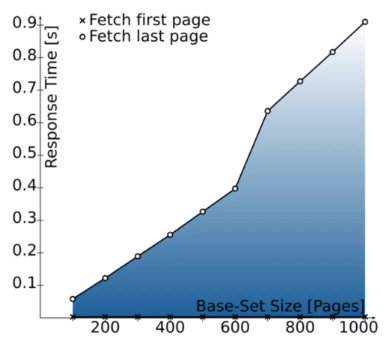
As you can see, fetching the first pages is snappy, but response time increases as you go further back.
- But there is a better solution to this issue and that is using a “seek method”.

WHERE Implementation – Cursor-Based Pagination – Seek Method
Jargons:
- A cursor is a tool that helps you navigate through rows of data in a database query result. Imagine it as a marker that moves row by row through a table to check or update the data.
- Keyset cursor:
- Uses a compound cursor.
- E.g. it can use
created_atandid.
First variation
In this variation we do not construct the next page in our query/backend. So client has to make a request to the backend, and if we returned an empty array then our frontend realizes that that we were at the last page. This might be good in one scenario, when we are sure until user reaches the end of the current page we’re gonna have a new page for sure.
Here we are first starting without indexing published_at field.
SELECT * FROM public.news_articles
WHERE
  topic = 'huawei'
	AND (
    published_at,
    id
  ) < (
    previous_published_at,
    previous_id
  )
ORDER BY published_at DESC, id DESC
LIMIT 10;
[!CAUTION]
Here we’ve assumed that:
idis auto increment (an integer). If you’re like me (use UUID everywhere as your ID) it is not gonna pose any form of issue AMAIK.- A definite sort order is mandatory.
- The second part of the
WHEREclause is a tuple comparison and it MUST be implemented that way. If you declare them as two filters, implemented independently then it would result in most rows failing to show up at all. You need to implement theidfilter only within ties of thecreated_atfilter.
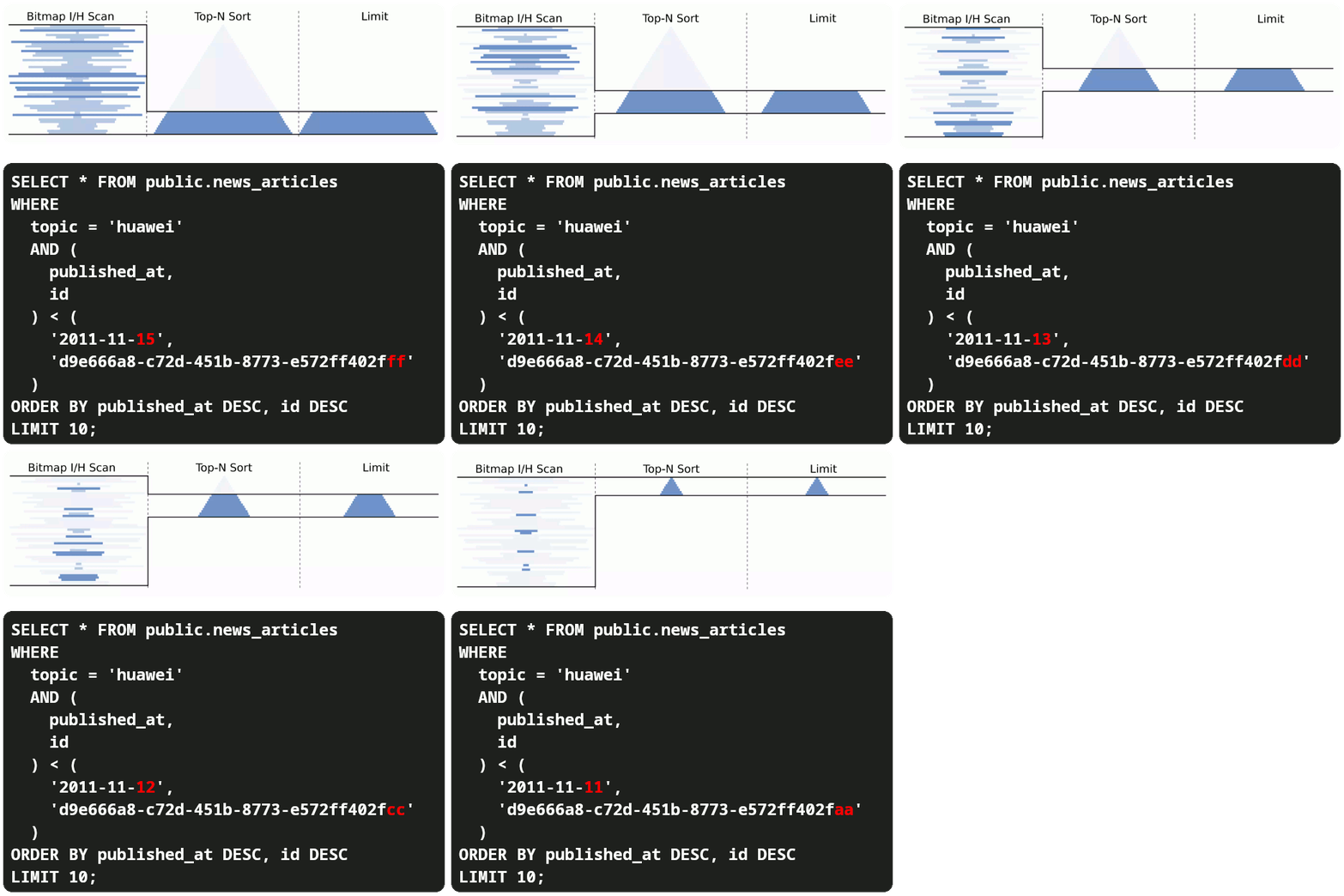
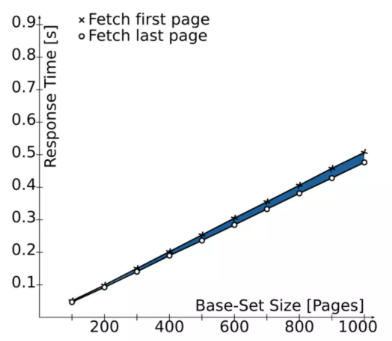
Since we are no longer fetching lots of data just to sort (ORDER BY) and then skip (OFFSET and LIMIT) we have:
- Low response time.
- Low memory footprint.
[!TIP]
If we index the
published_attoo then we are gonna have a much lower response time.
Second variation
Here we compute and render the next page’s query before hand and send it back to our client. Something like this:
SELECT
  (SELECT count.count
   FROM (SELECT COUNT(id), created_at
	       FROM public.messages
	       WHERE sender_id = '' AND receiver_id = ''
	       GROUP BY created_at, id
	       ORDER BY created_at ASC LIMIT 10
        ) as count
  ),
  (SELECT JSON_AGG(TO_JSONB(messages))
   FROM (SELECT *
      	 FROM public.messages
      	 WHERE sender_id = '' AND receiver_id = ''
         ORDER BY created_at ASC
         LIMIT 10
        ) as messages
  ) as data
;
- Note that here because we are using
COUNTwhich is an aggregate function we need to useGROUP BYtoo. In PostgreSQL, when you use an aggregate function, any non-aggregated columns in theSELECTclause must either:- Appear in a
GROUP BYclause. - Be wrapped in an aggregate function as well. And to have an accurate result I said to
GROUP BYbothidandcreated_at.
- Appear in a
- Because our first subquery returns two column we nested it once more to just return the computed count in which we are interested.
![CAUTION]
This query might return null as value for both columns. Thus you need to handle it gently. IDK, define default values or whatever suits your situation best.
Seek method VS OFFSET
There are a couple of limitations that seek method has:
- User cannot navigate to an arbitrary page (needs values from previous page). This is not a problem if you have infinite scroll. Something like this in your ReactJS app.
- To go backward (like scrolling upward in your ReactJS app) you need to:
- Reverse the tuple comparison:
# ... AND ( published_at, id ) > ( previous_published_at, previous_id ) # ... - Sort ascending:
# ...
ORDER BY published_at ASC, id ASC
# ...
- Reverse the tuple comparison:
- PostgreSQL has the best support for it.
References
- Ref1.
Learn more
- https://ddnexus.github.io/pagy/docs/api/keyset.
- https://www.cybertec-postgresql.com/en/keyset-pagination-with-descending-order.