Replace import Path With Another Path
- So I was refactoring our codebase and I had like a ton of places where I was importing a helper function from a relative path. Then I had created this library and put that helper function in it (in fact it contained all of my utility functions), so now the problem was that I ad to find all places where I was importing the aforementioned lib and replace the whole import with something like this:
my-custom-lib. And like I said the relative paths were things like this: ../../common/utils/abc, ./abc, ../../../../common/utils/abc, you get the idea. So what I did was two things:
- I installed this lib:
eslint-plugin-import and used their no-duplicates rule in combination with eslint-plugin-perfectionist to automatically merge all duplicates (because I was importing each helper function directly I had like 2 or 3 imports from the same dir which now had to be merged into a single import).
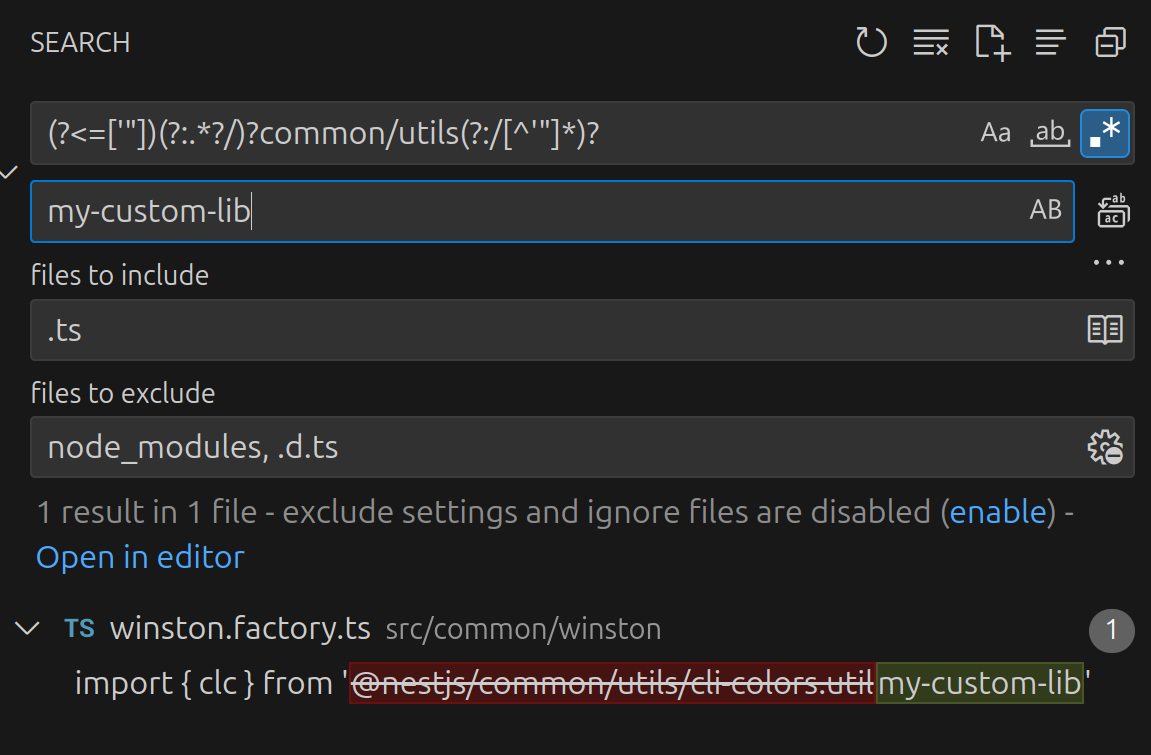
- I used a regex in my VSCode to find all occurances of my helper functions imports:
(?<=['"])(?:.*?/)?common/utils(?:/[^'"]*)? and then replaced them all.
(?<=['"]) ensures the match only starts after a quote (‘, “) — so it won’t include the import {...} from ' or similar.(?:.*?/)? optionally captures any path-like prefix (e.g., ../../).(?:/[^'"]*)? indicates that it should match anything unless it reaches another single quote or double quote.