[!IMPORTANT]
Filtering using prisma-nestjs-graphql
-
pnpm add @paljs/plugins
pnpm add --save-dev prisma-nestjs-graphql
nx add @nx-tools/nx-prisma
nx g @nx-tools/nx-prisma:configuration --project botprobe-nest --database postgresql
[!NOTE]
@paljs/pluginwill hlp us to fetch exactly the data that we wanted. Though please note that it is not gonna solve the N+1 issue.- Change the project name to whatever is yours.
-
If your models have
DecimalorJSONtypes, you need to install:pnpm add graphql-type-json prisma-graphql-type-decimalOr we can create custom graphql scalar types for these types (learn more).
-
generator nestgraphql { provider = "node node_modules/prisma-nestjs-graphql" output = "../src/@generated" }- Do not forget to add the
@generatedentry to your.gitignore. - You can use
emitSingleto have a single index file containing all the generated args, etc. - Add
requireSingleFieldsInWhereUniqueInputin case your table has only one field.
- Do not forget to add the
-
cd apps/botprobe-nest nest g module alert nest g service alert nest g resolver alert nest g module alert-type nest g service alert-type nest g resolver alert-type - Check
apps/botprobe-nestto see what goes inside those files. - And to see how you should write e2e tests read the
apps/botprobe-nest-e2e. - Use
///to customize the generated code:/// @HideField().- For class-validator you need to:
-
pnpm add class-validator class-transformer -
// src/main.ts import { ValidationPipe } from '@nestjs/common'; // ... app.useGlobalPipes(new ValidationPipe()); // ... -
generator nestgraphql {
  fields_Validator_from = "class-validator"
  fields_Validator_input = true
}
// ...
model User {
  // ...
  /// @Validator.MinLength(3)
  name String
  // ...
}
// ...
Find more examples in
apps/botprobe-nest.
-
![IMPORTANT]
# According to my experiences with this lib there are a couple of things which needs your consideration:
Downsides IMO
- The naming of input types does not make sense.
- Optional fields are not optional in the generated TS class.
- In
apps/botprobe-nestI used@paljs/pluginwhich simplifies selecting the fields that client asked for. But be aware of these issues:prisma-nestjs-graphqldoes not delete the previous @generated before generating the new one (purgeOutput).- There is not any way to deprecate a relation field.
- Pagination and fetching data from external APIs and incorporating them in your API requires a lot of manual work (learn more here):
query {
  post {
    # `user` data is stored in our FusionAuth e.g.
    user {
      id
      username
    }
    # `commentsConnection` is implemented according to the Cursor-based Connections Spec.
    commentsConnection(
      first: 5
      after: "encodedValueWithBase64Algorithm"
    ) {
      edges {
        cursor
        node {
          id
          content
        }
      }
      pageInfo {
        hasNextPage
      }
    }
  }
}
Upsides IMO
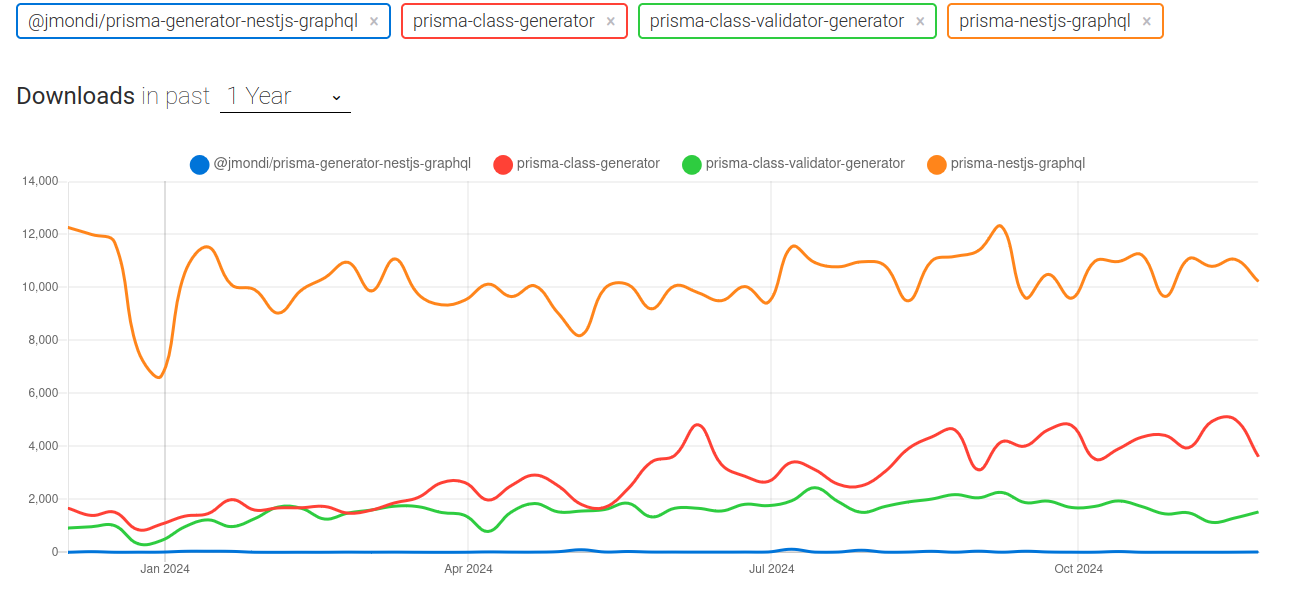
I did a quick npm trends and it seems that this lib reign supreme in Prisma but the downsides are too many: