GraphQL
- A query language for your API.
- Note that GraphQL query language is basically about selecting fields on objects.
- A server-side runtime for executing queries using a type system you define for your data.
- The GraphQL specification is open-source.
- GraphQL is not tied to any specific database or storage engine – it is backed by your existing code and data.
My definition of GraphQL
GraphQL is a structured way of talking to the backend and asking for data or performing an operation in a specific way within the established framework of our backend. Meaning we ain’t gonna let client to do whatever they want but will give them more room to play but will still have some form dos and don’ts.
[!NOTE]
Answers to some of questions that I yearned to know:
- GraphQL is transport-layer agnostic: This is copied and pasted from GraphQL here, in fact this was a burning question for me that if I should stick to HTTP/S or should I use a different protocol. But in short we do not need to change our protocol.
… the GraphQL specification doesn’t require the use of a particular transport protocol for requests … it is common for HTTP to be used for stateless query and mutations operations. Long-lived, stateful subscription operations are often supported by WebSockets or server-sent events instead.
— Ref.
- And related to the previous note, in general in GraphQL we serve our GraphQL service via a single endpoint as described here.
- This was my second question that I was trying to find an answer to it and it was actually just a few links away from me. In graphql.org they have a section for tools and libs. There I was able to compare and find the right tool for my next move, deciding on a lib for my backend app.
graphql-toolsreally handy when you’re approach is schema-first and not code-first.@apollo/serveris there to help you build a spec-compliant GraphQL server in no time.graphiqlgives you a nice GraphQL IDE, though personally I am using most of the times the IDE that comes with@apollo/server.graphql-meshhelps us to do multiple things:
- Integrate all of our 3rd-party APIs, databases, and other GraphQL APIs into a single API (more on that in the federation).
- Generate SDKs for your GraphQL API.
How you create your API in GraphQL
A GraphQL service (AKA GraphQL backend) is created by:
- Defining types and their fields.
- Writing a function for each field to provide the required data.
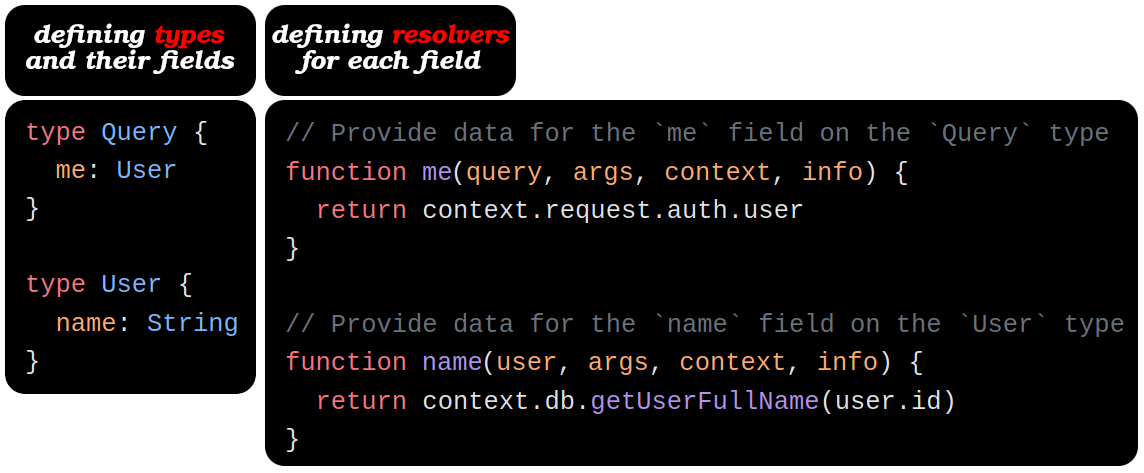
[!TIP]
Learn about the four available arguments in a resolver here.
Sales pitches of GraphQL
Query what you need
A GraphQL service is running (typically at a URL on a web service):
- It receives GraphQL queries to validate and execute from clients.
- The service first checks a query to ensure it only refers to the types and fields defined for the API.
- Then runs the provided functions to produce a result.
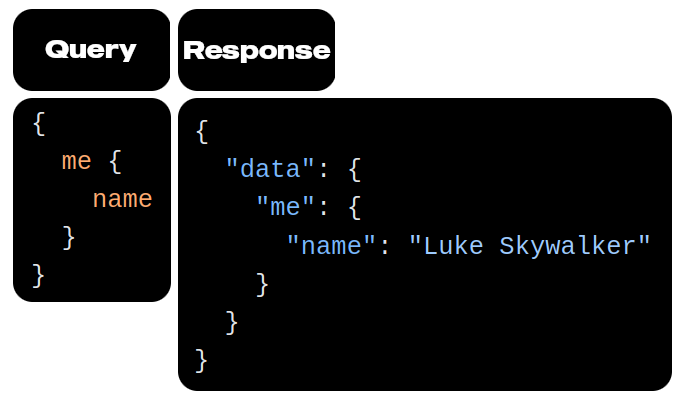
[!NOTE]
Client can make queries to the API, here we our client benefits from:
- Responses in the expected shape.
- Receiving just the data with a single request (no roundtrip).
[!CAUTION]
# Operation name
Here we are omitting our query name and operation name. But when you’re developing a real software better to include them to prevent any ambiguity.
query FetchUserInfo {
  me {
    name
  }
}
- You can also have anonymous
mutationoperations too. But it is encourages to use named operations since they will give us an edge in:
- Debugging.
- Code readability.
- Server-side logging.
- Similar to function names.
No need to do API versioning
- Change your API based on ever evolving client needs without the overhead of managing different API versions.
-
E.g. we’ve got a new feature to develop. Like when you wanna display more info about user on their profile. Thus
Usertype could be updated as follows:type User { fullName: String nickname: String name: String @deprecated(reason: "Use `fullName`.") }So here is a break down of what will happen next:
- Our client can still use
namein their codebase. - They can see that
nameis flagged as deprecated. - They refactor their code to use
fullnameinstead. - We’re sure that nobody is using
nameanymore. Thus we get rid of it entirely.
- Our client can still use
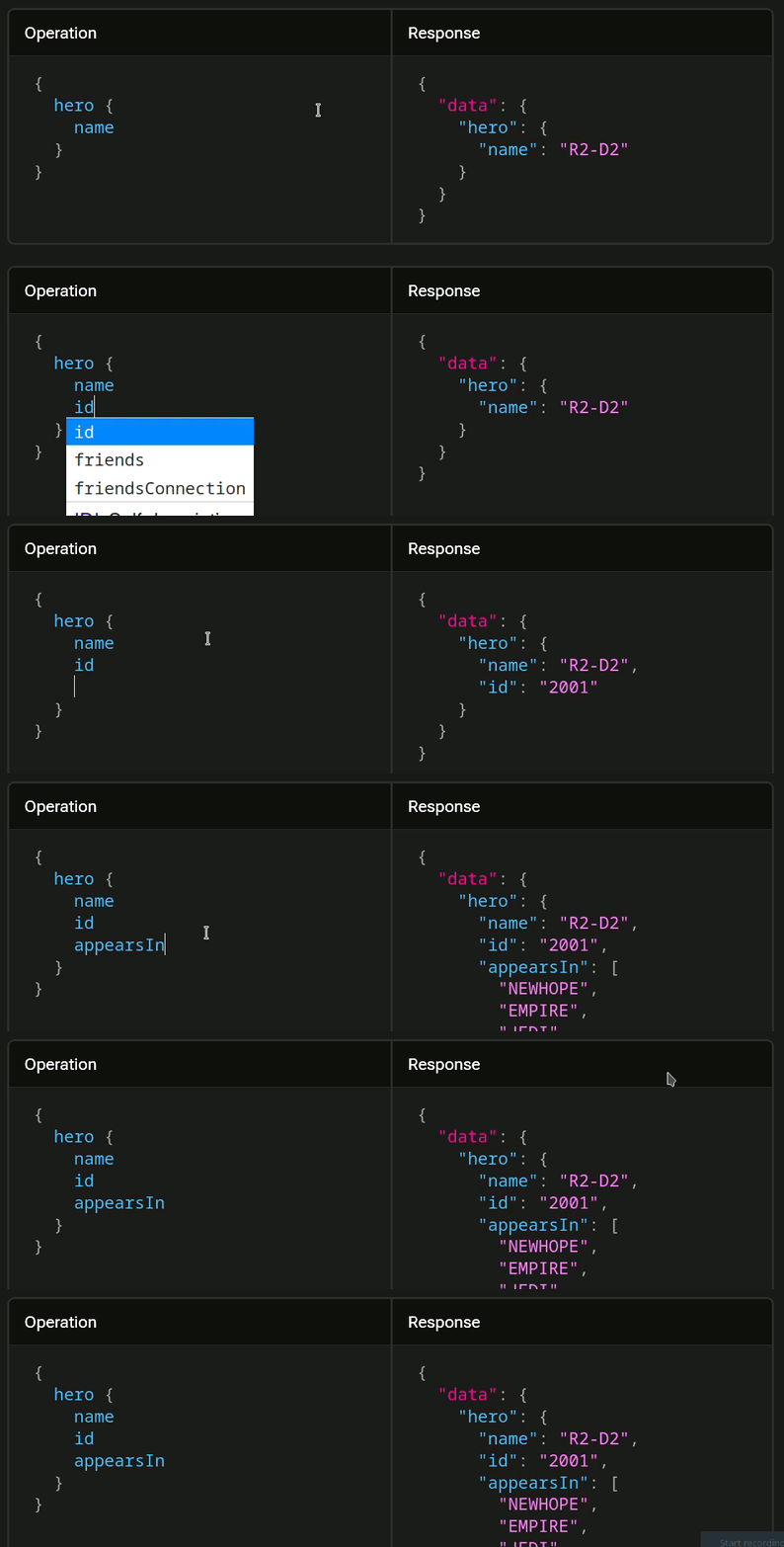
Here is another example of fetching user info when we are only interested in user’s name, id and appearsIn.
Hello world app ;)
pnpm add graphql- Define a schema for your GraphQL service.
- This is where we define our
Querytype.
- This is where we define our
- Define root API (AKA root resolver).
- Defines functions that correspond to the top-level fields in the
Querytype of the schema.
- Defines functions that correspond to the top-level fields in the
- Define the query.
- Make a call to your GraphQL.
Code: https://github.com/kasir-barati/graphql-js-ts/blob/main/apps/hello-world/src/main.ts.
ExpressJS + GraphQL
pnpm add "express@>=5.0.1" graphql-http graphql.nx g @nx/express:application apps/expressjs-hello-world.pnpm rm @nx/web @nx/webpack @pmmmwh/react-refresh-webpack-plugin @svgr/webpack webpack-cli react-refresh.- Remove webpack plugin from
nx.json. And fromproject.json+ its files. nx add @ns/esbuild.- Update your
project.jsonto use esbuild instead of webpack.
- ExpressJS to run a web server.
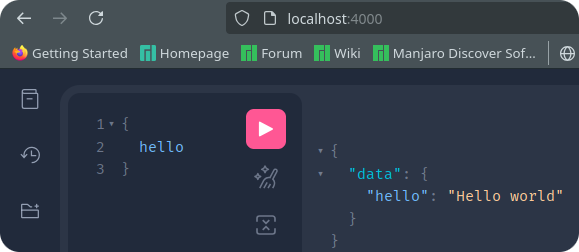
graphql-httplib to mount a GraphQL API server on the/graphqlHTTP endpoint.pnpm add ruru.- GraphiQL is GraphQL’s IDE.
- You can query and explore your GraphQL API with it.
-
Or you can run the e2e tests for it:
nx e2e expressjs-hello-world-e2e.BTW To learn more about my thought processes and why I did test it this way you can read this.
Code: https://github.com/kasir-barati/graphql-js-ts/tree/main/apps/expressjs-hello-world.
[!TIP]
- Use Relay as your client in your ReactJS app.
- Or use
graphql-httpto just invoke your GraphQL endpoints over HTTPPOSTrequests.
Dynamic values
To construct GraphQL queries first we need to defined the schema:
type Query {
  rollDice(numDice: Int!, numSides: Int): [Int]
}
Then:
const dice = 3;
const sides = 6;
const query = /* GraphQL */ `
  query RollDice($dice: Int!, $sides: Int) {
    rollDice(numDice: $dice, numSides: $sides)
  }
`;

fetch('/graphql', {
  method: 'POST',
  headers: {
    'Content-Type': 'application/json',
    'Accept': 'application/json',
  },
  body: JSON.stringify({
    query,
    variables: { dice, sides },
  }),
})
  .then((r) => r.json())
  .then((data) => console.log('data returned:', data));
Let’s break down
query RollDice($dice: Int!, $sides: Int) {
  rollDice(numDice: $dice, numSides: $sides)
}
- A word prefixed with a dollar sign is a variable in the query.
RollDice:- Optional.
- Serves as an identifier for the query.
- The name of the query operation in the GraphQL syntax.
rollDice:- Query type defined in the schema.
body: JSON.stringify({
  query,
  variables: { dice, sides },
}),
variables:
- Passes field values to the payload.
- The server will replace
$diceand$sideswith the values inside the request body. - No need to escape characters, e.g.:
- If you embed a value like “O’Hara” directly into a GraphQL query.
- The apostrophe interfere with the query syntax (parsing error).
- To prevent this, you’d have to escape it by adding a backslash to ensure the character is read correctly.
- Like: “O'Hara”.
GraphQL is not The Same as REST
- GraphQL was designed at Facebook to handle complex systems with many, many small services (microservices).
- It lets you make one request to get data from different microservices.
- Do not write too deep queries, keep them as flat as possible (more on that in complexity).
- In each UI component make request for the specific data they need.
- Keep resolvers lightweight & simple: GraphQL’s strength is that it can call many services in parallel to get data efficiently.
- In REST in one endpoint we usually tend to do a lot of work so that we can:
- Return all the data for a page in a single request.
- Or to process all the business logics.